Product Memory
Building software is complex. Information is translated into valuable outputs that drive activation, increase adoption, and improve retention. And now we’re doing that work at a faster than ever before.
Speed and quality are forever in tension.
But, right now, what matters most of all is making sure you remember and understand.
Product teams forget
I can’t tell you how many times I’ve been in a conversation where we’re trying to recall the reasoning for a decision. The team knows we made the decision for a reason, but can’t remember the exact why. It’s understandable. There are hundreds of local decisions being made every day while building software. Take that number and compound it with AI, and it’s no wonder a product team’s memory is bad.
AI is outpacing understanding
Instead of taking time to discuss or write out thoughts, we’re using our AI agents as a proxy for communication and understanding. Your agent talks to my agent instead of us talking to one another. If you don’t participate in the process, you can’t understand what AI creates.
Coherence is lost.
All agents need shared context
Multiple intelligences now work together as independent agents and collaborators. Your team of human designers, engineers, and strategists employ their own agents, compounding the lines of communication and increasing the rate of context degradation.
Sharing context means building on top of the same information. Decisions are only as good as the context you leverage to make them.
I spend a lot of time cultivating context, like a gardener watering the plants, making sure they have adequate sunlight, and keeping the soil full of rich nutrients. The context emerges from the environment. You have to curate it.
An engineer pinged me in Linear to help with a decision. Actually, his agent did. He used Claude Code and the Linear MCP to propose a solution to resolve an issue. The agent provided three options, but I proposed a fourth and much simpler option. It agreed.
That conversation is important.
In the past, we’d discuss directly or bring the team into the conversation on a call. It’s good the agent surfaced the decision point instead of blindly moving forward. And it’s good the conversation took place in Linear, which is visible to the entire team. But if you miss the moment and don’t take part, coherence drifts.
I don’t know what the engineer said to his agent when I proposed another option. Did he ask it to review my comment and make a decision? Did they collaboratively investigate the option and agree? I don’t know. That’s part of the thread of thinking still missing.
To operate in this new world of AI-assisted development, you need to be diligent and intentional with how, when, and where decisions are made. You need to keep context current and clear while the spiderweb of information spreads over time. Eventually we will all have several AI agents operating on different things in the background.
Coherence requires understanding. And understanding requires shared context.
Product Memory
I call this the Product Memory, a continuous process of creating and refining artifacts in a shared space for human and AI agents.
It consists of three parts:
- Memory Views → Artifacts
- Memory Circuit → Transformation
- Promotion Gates → Governance
Memory Views
The Memory Views are the living artifacts documenting the product work:
- The feedback you collect to know what and how to improve the product.
- The signals you capture to separate the signal from the noise.
- The decisions you make to determine what changes to make and when.
- The releases you deploy to create and refine value in the product.
- The updates you share to spread the word about the most important changes.
Feedback → Signals → Decisions → Releases → Updates
It’s not linear, either.
The updates generate new feedback, operating like a flywheel and growing stronger the more you improve the system.
That’s the key part.
You can’t create “slop cannons” or “software factories” and expect quality outputs on the other side. It requires human judgement and participation in the process—asking the right questions, choosing the right things to build, and knowing how to pace the work.
These are just the artifacts.
To transform the information into something coherent enough to operate on, you need to understand what each artifact represents.
Memory Circuit
The Memory Circuit is the conversion process for the artifacts. Feedback sitting in a document or a Linear is only so useful. You need to know what the feedback represents and how you can translate it into the next stage of development.
Here’s what each artifact represents:
- Feedback → Evidence
- Signals → Interpretation
- Decisions → Judgement
- Releases → Action
- Updates → Narrative
You begin with the evidence. You notice what’s happening. Then you interpret that into something you can operate on. You make a decision and meet reality. Then you craft the narrative to create new evidence.
The Memory Views are the artifacts.
The Memory Circuit is the transformation.
Let’s use a simple example.
A product team notices new users sign up but don’t complete their account setup.
Feedback → Evidence
Product analytics show users don’t set up their account after they sign up. User interviews produce qualitative data that confirms users don’t know what to do.
Signals → Interpretation
The product team concludes that there isn’t enough guidance for new users after signup.
Decisions → Judgement
The team decides in-product guidance would help users know what’s next.
Releases → Action
The team adds a short checklist right after a user signs up. It gives them a few tasks to complete in order to set up their account.
Updates → Narrative
A blog post and demo walks through the new checklist and how it helps account setup.
Promotion Gates
You can’t endlessly add new features to software without reconciling what’s already there. Well, you can, but then you end up with enshittified software actively designed to make it harder for paying customers to do their job.
Every feature is a mental model for users to learn and understand. If you’re asking them to do that, it’s only fair to take time to make it as easy as possible for them to do so. Product work is really just aligning mental models—your team’s and your customer’s—so the software gets out of the way and lets them complete their job with ease.
Without constraints, coherence drifts as new changes create more changes without considering the product as an integrated unit.
Complex systems break down without balancing loops to maintain equilibrium.
Like all things, you need balance.
Promotion Gates live between each part of the Memory Circuit, balancing the flywheel and maintaining coherent quality in the system.
- Significance gates signals worth pursuing to better understand their value.
- Readiness gates decisions to protect the integrity and quality of the product.
- Coherence gates what changes ultimately integrate into the product.
- Relevance gates what updates are worth sharing as part of the overall narrative.
- Learning gates what feedback is worthy of attention, reflection, and consideration.
Promotion Gates protect transformations:
- Feedback → Significance → Signals
- Signals → Readiness → Decisions
- Decisions → Coherence → Releases
- Releases → Relevance → Updates
- Updates → Learning → Feedback
Going back to our previous example with users not completing their account setup.
Significance Gate
Does this matter enough to become a signal?
If users don’t set up their account, they miss out on a key moment of activation. We miss the inflection point and risk churn. And it’s not a small problem: 63% of new users don’t set up their account and fully activate.
✅ Significance
Readiness Gate
Do we understand enough to choose a direction?
We researched other products, leveraged our intuition, talked to customers, and ran small experiments to point us to a solution.
✅ Readiness
Coherence Gate
Is this change coherent enough to release?
There is a clear section of the sidebar to show a checklist of actions. The surface area of the change is small and easy to experiment with.
✅ Coherence
Relevance Gate
Does this matter enough to communicate?
This is a new step in the onboarding process tied directly to user feedback.
✅ Relevance
Learning Gate
What did reality teach us?
Users complete more steps to set up their account, but they still get stuck on one of the key activation steps in onboarding.
✅ Learning
The Practice
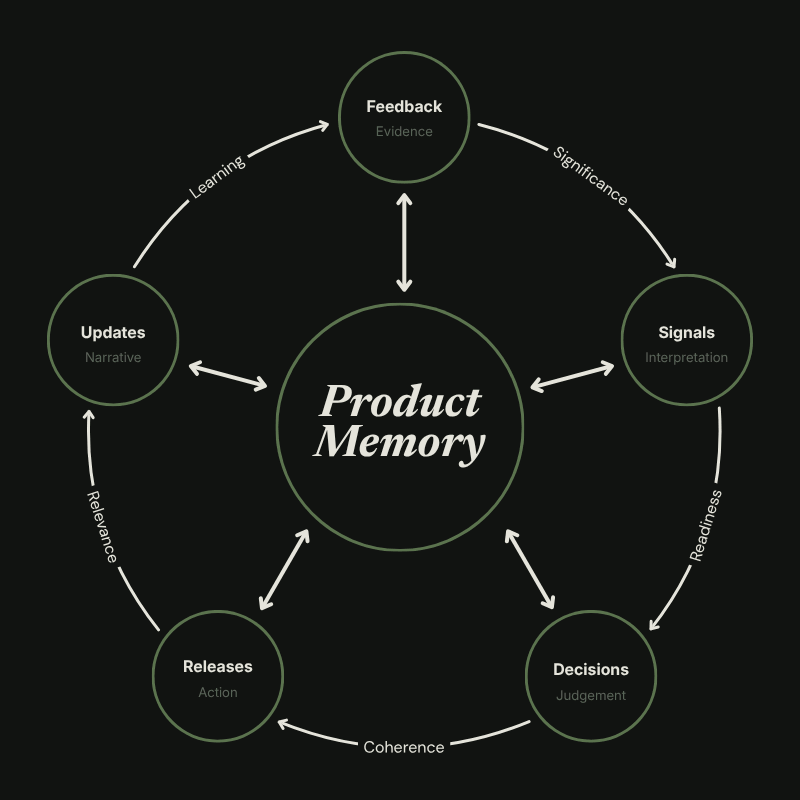
We’ve walked through the key parts of Product Memory, but what’s most important is putting the system into practice. I’m going to use the example of how I implement this, but find the tool and process that works for your team.
Linear has a feature called Loops, which are simple automations that run a prompt and connect to different data sources to complete a number of actions. You can add labels to issues or write documents or make any number of updates inside of Linear.
I created five documents in Linear mapped to the Memory Views of Product Memory:
- User Feedback
- Emerging Signals
- Decision Log
- Release Notes
- Weekly Updates
I created a set of Loops to run off different triggers and make updates to these docs. Each one is entirely written by an AI agent that’s continuously running and monitoring them. I don’t do anything other than make occasional tweaks to the instructions to nitpick the formatting or refine based on team feedback.
What’s even better is the Loops read the docs they’re creating. The Decision Log and Weekly Updates read the Release Notes; the Emerging Signals reads User Feedback. And each Loop can look outside of Linear by leveraging MCPs. User Feedback pulls from UserJot and PostHog, for example.
User Feedback pulls from those data sources and any other feedback captured in Linear to write to the document. It writes it fresh every day. It categorizes any themes in the feedback and points out related issues in Linear.
Emerging Signals looks at User Feedback, Sentry, and PostHog. It writes a fresh version every morning like User Feedback. It’s looking for any clear issues, workload imbalances, or stalled work. It’s even set up to open new issues when it finds a clear signal. They land in Linear Triage for me to review.
Decision Log watches updates in Linear and the Release Notes to document key decisions by day. It’s a running log, so it doesn’t rewrite itself, but it does consolidate decisions or overwrite them when they change. The team can talk to each other and their agents, and then funnel the context of decisions back into Linear where the Decision Log picks them up.
Release Notes tracks every issue update and logs the completed issues as either fixes, improvements, or callouts by day. The bullet points are written as customer-facing summaries to make them easy to understand.
Weekly Updates runs every Monday and reads the Release Notes to summarize the main fixes, improvements, and callouts from the previous week of work. I use this to then plan my Weekly Updates video for the company.
To practice this yourself, you need to.
- Capture feedback in one place.
- Scan data to surface signals.
- Document key decisions.
- Release intentional changes.
- Share updates regularly.
Human Judgement
Product Memory is part of a lineage of ideas:
- Work Registry creates the shared context to document the work in a consistent and predictable manner.
- Coherence Graph takes that to the next stage by making sure the context is not only shared, but is understood and coherent.
- Product Memory turns that into a continuous memory system with governance to make sure only the right signals advance.
Said simply: Context is shared, understood, and preserved.
Human judgement is still an integral part of the process. I leverage AI to monitor and maintain the documentation, but I operate the Promotion Gates. I review the information and then use my judgement to decide what advances forward. I intentionally use my judgement as friction in the process.
It’s a useful tension to maintain quality and coherence.
Think slowly in systems designed for speed. That is the human amplifier.
Enjoying this issue? Sign up to get weekly insights in your inbox: